
The MCME Dynamic Map can be a very useful resource for navigating the server. The Dynamic Map is a live map of the server that you can access from your favorite web browser. This resource will step you through the process of using this valuable tool.
Step 1: Navigating to the website
In your preferred web browser (Chrome, Firefox, ect.), go to this website: http://build.mcmiddleearth.com:8123/
or you can use http://map.mcmiddleearth.com
Step 2: Using the Dynamic Map
Once you have clicked the above link you will see a page similar to this:
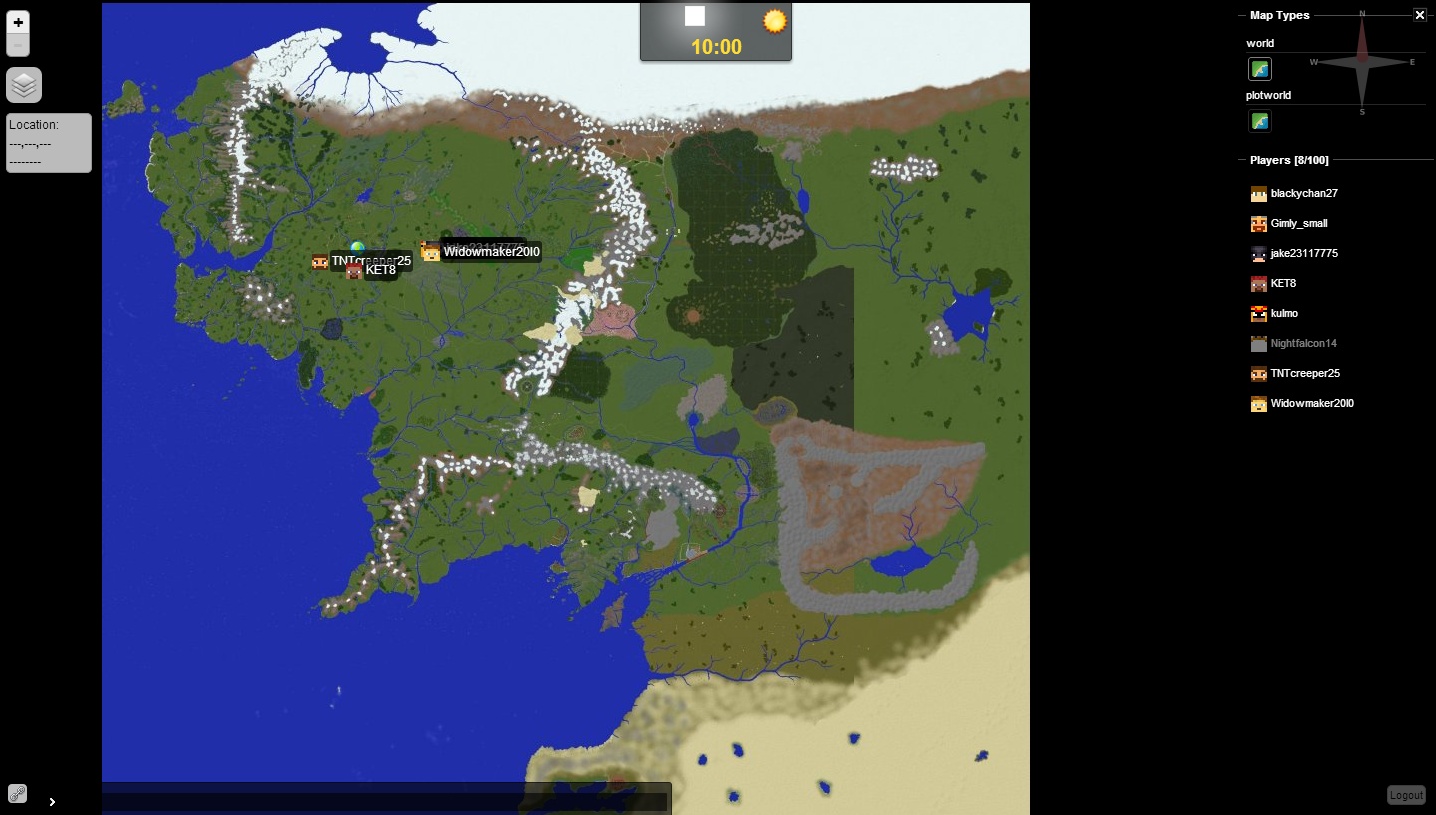
There are few useful tools that can be used from the Dynamic Map.
On the left of the screen from top to bottom are:
Zoom Controls - Zoom in closer or farther away from the map
Map Layers - Enable/Disable parts of the map
On the right of the screen from top to bottom are:
Map Types - Choose between maps of the various worlds
Players - List of the players currently online. Players that are lit up are in the world you are currently viewing.
Logout - Click to log out of the dynamic map.
You can also click/drag on the map to change your view.
Last Updated: Feb. 18, 2015
Step 1: Navigating to the website
In your preferred web browser (Chrome, Firefox, ect.), go to this website: http://build.mcmiddleearth.com:8123/
or you can use http://map.mcmiddleearth.com
Step 2: Using the Dynamic Map
Once you have clicked the above link you will see a page similar to this:
There are few useful tools that can be used from the Dynamic Map.
On the left of the screen from top to bottom are:
Zoom Controls - Zoom in closer or farther away from the map
Map Layers - Enable/Disable parts of the map
Players - Turn Player Icon On/Off
Markers - Turn Spawn Marker On/Off
ResourceRegions - Turn outlines for the resource pack regions On/OFF
Warps - Turn warp icons On/Off
Location - x,y,z coordinates of your pointer on the mapMarkers - Turn Spawn Marker On/Off
ResourceRegions - Turn outlines for the resource pack regions On/OFF
Warps - Turn warp icons On/Off
On the right of the screen from top to bottom are:
Map Types - Choose between maps of the various worlds
Players - List of the players currently online. Players that are lit up are in the world you are currently viewing.
Logout - Click to log out of the dynamic map.
You can also click/drag on the map to change your view.
Last Updated: Feb. 18, 2015
